A project, end to end.
This is the real order of operations — the same path you'd walk on day one of an implementation. Each step is a screen in the system.
The spine of the data model: Client → Project → Control Account → Work Package / Resource Allocation. Everything below hangs off that spine. WBS, discipline, area, phase, cost type — those are reporting columns you define, not a hierarchy you're locked into.
Create a project
Set the project up under a client: code, name, currency, and the period calendar it will report on. The period calendar is the clock every number in the system answers to.
Add control accounts
The control account (CA) is the unit of accountability — the thing an owner is on the hook for. Add them one at a time in the UI, or paste hundreds in at once through the Data Grid in CA Metadata mode.
- Each CA carries your own classification columns (WBS, area, discipline, cost type, contract, phase…).
- Work Packages and Resource Allocations sit under the CA for drill-down.
Load the budget and the first forecast
Budget is handed down. The cost professional may build it and steward it, but it is approved by someone above — so PCS treats budget as a log of approved amounts, split into original and changes, never quietly edited.
- Control owns how much. Phased owns when.
- Any drift between the two is surfaced, not blocked — you'll see the unphased remainder, not an error message.
- That first Forecast To-Go is your first forecast. From here on, forecast is a living thing.
Run the commercial chain
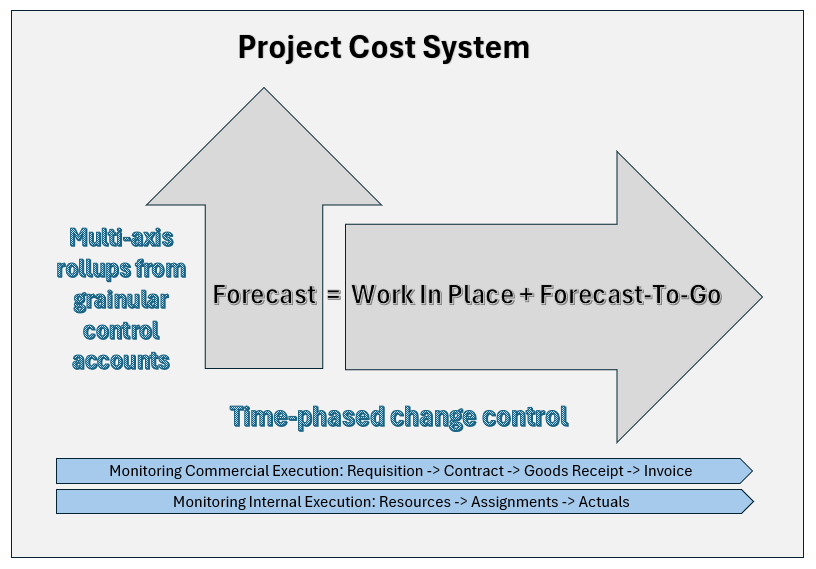
Requisition → Contract / PO → Goods Receipt → Invoice Received → Invoice Paid. Every commercial instrument in one place, mapped to the control accounts that carry the cost. Call it mise en place: everything laid out where you can reach it.
- Contracts and POs allocate to work packages; committing a contract writes the commitment into the forecast automatically.
- Goods receipts and invoices arrive by batch import from whatever system already owns them.
- Cash-out is tracked separately from work in place — because the month you earn it is not the month you pay it.
Assign resources
Staffing and other internal cost, planned the same way as everything else: set up the resource, assign it to a control account, phase the hours, then report Work In Place and Forecast To-Go against the assignment.
- Resource setup and rates → resource list → assignment → assignment Work In Place & Forecast To-Go → actuals.
- Escalation applies the compounding effect of cost-of-living, inflation, and trade policy over the life of the assignment.
Bring in the schedule
Schedule drives phasing. Tag your control accounts, work packages, or assignments with a schedule ID, import the activity dates, and PCS will re-phase the forecast curve to match the plan the project is actually working to.
- Multi-source by design: the scheduler, the expeditor, and the field all update the same picture.
- The re-phase is proposed, then applied — you see the change before it lands.
Update the forecast, and say why
This is the heart of the system. Forecast, WIP, and Forecast To-Go are managed as three independent variables so you can update in any direction as information arrives — but the relationship between them holds, and period close resolves them.
- WIP earned — what's actually in place this period.
- Forecast To-Go — what's left, phased forward across future periods.
- Forecast — where this lands. Forecast = Work In Place + Forecast To-Go, per control account, always.
- Every change creates an update, and every update is assigned to a trend.
Trends are what turn a spreadsheet into a story: they group like changes so you can see the pattern across periods, and classify why the cost moved — scope change, delay, estimate miss, escalation, or a contingency draw.
Track revenue, not just cost
The client's money is modelled the same way yours is. Link control accounts to a client contract, phase when revenue will be earned, then raise a proforma invoice and track it to payment.
- Milestone contracts get their own revenue-only control accounts; T&M revenue rides along with the cost CAs.
- Invoices have a real lifecycle — draft → issued → paid — and issuing locks the record.
- Cost and revenue in one model means margin is a report, not a reconciliation exercise.
- Cash-in forecast against cash-out forecast: the working capital you are funding on the client's behalf, visible before it becomes a phone call.
- Bill in the client's currency, buy in the vendor's, report in yours.
Report it
Everything above feeds one long-format fact layer, and every report reads from it. Same numbers, five ways to look at them.
- Cost report — the classic period cost report, by any column you defined.
- Pivot — slice the fact layer however the meeting needs it.
- Curve — budget, Work In Place, Forecast To-Go, Forecast, commitment, cash in and cash out, on one time axis.
- Mode & Map — compare PCS against the external system of record it was fed from.
- Saved views — set the grid up once, save it, and hand it to the next person.
Administer it
The plumbing a real client will ask about on day one: periods and period close, users, roles and permissions, the client-defined metadata columns, escalation indices, currency, and comments that thread anywhere in the system.
- Comments attach to any record — a question, an action, a note — and get assigned and resolved.
- Roles are built from a capability catalog: view or edit, your own records or all of them, per function.
Want to click around instead?
A sandbox with real seeded data is on the roadmap — a place to press every button without breaking anything. Until it's ready, I'll walk you through the live system myself.